Explain pip install errors
Paste the output of a failed pip install and Vibe explains it in plain English: which requirement in your file failed, why pip tried to build it from source, which line in a long build log holds the cause and what "No matching distribution found" means.
Up to 1,500 characters (about 60 lines). Your code is sent to Unvibe and Anthropic to write the explanation. Don't paste keys or passwords. Common key formats are refused.
Vibe25 lines selected
Press Explain it for the sample, or paste your own code first.
What this pip install error sample shows
- which requirement failed
Collecting psycopg2==2.9.9 (from -r requirements.txt (line 2))names the file and the line pip was on. flask's line names a.whlfile, a ready-built wheel, but for psycopg2 pip downloadedpsycopg2-2.9.9.tar.gz, source code that pip has to build first. The last line names the same package. Nothing was installed:pip freezeafterwards printed nothing, not even flask.- subprocess errors
error: subprocess-exited-with-errormeans pip ran the package's own build step, hereGetting requirements to build wheel, as a separate process, and it failed withexit code: 1. Everything between╰─> [34 lines of output]and[end of output]is that process's output, which is why pip addslikely not a problem with pip. pip itself then exited with code 1.- the cause in the build output
Error: pg_config executable not found.is the cause: psycopg2's build needs a program called pg_config, andwhich pg_configfound none on this machine. In the full output it's line 19 of the 34 in the box, after a setuptools warning about license classifiers that has nothing to do with it. The same message suggests a way out, the PyPI'psycopg2-binary'package.- the versions pip found
- A pin that doesn't exist fails before any build.
pip install psycopg2-binary==9.9printedCould not find a version that satisfies the requirement, listed the 26 versions it did find, from2.7.4to2.9.13, thenNo matching distribution found. A misspelledpyscopg2got(from versions: none). With--only-binary :all:, which stops pip from building anything, the psycopg2-binary list shrank to2.9.11, 2.9.12, 2.9.13, andpsycopg2==2.9.9got(from versions: none).
Good to know
- Run with pip 26.2.1 and Python 3.14.7 on Linux, in a fresh venv made with
python3 -m venvin a test project. Its requirements.txt has 2 lines,flask==3.1.0andpsycopg2==2.9.9. pip's output went to a file, not a terminal, so each step printedstartedandfinished with statuslines. In a terminal the same steps showed asInstalling build dependencies ... doneandGetting requirements to build wheel ... error. - Dropping the pin didn't help: plain
psycopg2downloadedpsycopg2-2.9.13.tar.gzand stopped at the samepg_config executable not found. What worked waspsycopg2-binary==2.9.11. pip downloaded a wheel made for Python 3.14,psycopg2_binary-2.9.11-cp314-cp314-manylinux2014_x86_64.manylinux_2_17_x86_64.whl, printedSuccessfully installedfor flask, the 6 packages flask needs andpsycopg2-binary-2.9.11, and exited with 0. The import name stays the same:import psycopg2worked and printed2.9.11 (dt dec pq3 ext lo64).
Before you trust it: A new package name doesn't help if the pinned version has no wheel for your Python. Switching to psycopg2-binary==2.9.9 failed the same way: pip downloaded psycopg2-binary-2.9.9.tar.gz, a source archive, ran the same build and printed Error: pg_config executable not found. along with the advice to install 'psycopg2-binary', the package it was already installing. With --only-binary :all:, pip listed only 2.9.11, 2.9.12, 2.9.13 for this Python, and 2.9.9 isn't among them. Before you trust a fix, check that the Downloading line for that package names a .whl file, not a .tar.gz, as it did for psycopg2-binary==2.9.11.
Explain pip install errors beside your editor
Unvibe is a free app for Mac and Windows. In the app there is no pasting: select code in any app and press Control+U (Ctrl+Alt+U on Windows).
Install on Mac
curl -fsSL https://unvibe.site/install.sh | bashPaste into Terminal. Unvibe isn't notarized by Apple yet, so this is the smooth path.
Or download the .dmg · Intel Mac build · SHA-256 checksums
No install warning? Use Unvibe in your browser
Opening the .dmg the first time
- Open the .dmg and drag Unvibe to Applications.
- Open it once; macOS says it can't verify it. Click Done, not the blue Move to Trash.
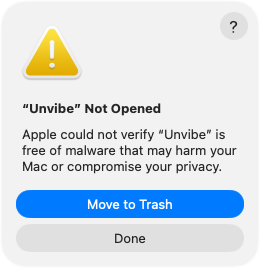
Real screen, macOS 26. On macOS 15 the two buttons sit side by side. - System Settings › Privacy & Security, scroll down to Security, then press Open Anyway. Confirm, then enter your Mac password. The button shows for about an hour after you try to open Unvibe.
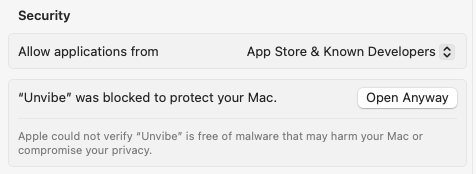
Real screen, macOS 15
The Terminal line checks the download against the published SHA-256 and Unvibe's self-signed signature before it installs anything. More help with the first open