Explain segmentation faults
Paste a segmentation fault and what your debugger printed, and Vibe explains it in plain English: which line crashed, which pointer was bad, and where that bad value came from.
Up to 1,500 characters (about 60 lines). Your code is sent to Unvibe and Anthropic to write the explanation. Don't paste keys or passwords. Common key formats are refused.
Vibe15 lines selected
Press Explain it for the sample, or paste your own code first.
What this segmentation fault sample shows
- Segmentation fault and exit code 139
- A segmentation fault means the program read or wrote memory it isn't allowed to touch, and the system stopped it with signal 11, SIGSEGV. The shell printed
Segmentation faultand the exit code was 139, which is 128 plus the signal number 11. The program printed nothing of its own before it stopped. - the backtrace
- Built with
-g, the program carries line numbers, so GDB could say where it stopped:mainat scores.c line 29, theprintfline.btlists the calls that led there, newest first. Here there is only frame#0, because the crash is inmainitself. - the NULL pointer
print bestshowed0x0:bestis NULL, sobest->scorereads from address 0x10, 16 bytes past NULL, andbest->namewould handprintfaddress 0.info localsshows why:count = 0. In scores.c, which isn't in the sample, line 28 setsbest = find_best(players, count), andfind_bestreturns NULL whencountis 0, because it never goes into its loop.mainused it without checking.- -O0, -O2 and AddressSanitizer
- Built with
-O2, the same input crashed the same way, with exit code 139. Built with-fsanitize=address, it printedSEGV on unknown address 0x000000000010,The signal is caused by a READ memory accessandHint: address points to the zero page, with the place as scores.c:29:52, thebest->scorepart of the line.
Good to know
- Run with clang 22.1.8 and GDB 17.2 on Linux x86-64. The sample is the commands and their output from one run, with the build folder's path and 3 of GDB's 11 lines left out (2 thread-library messages and a blank line). The
bash: line 1:line, with the process ID, is howbash -creported the crash; the sample runs it that way soechocan print the exit code. - What SIGSEGV means comes from the signal(7) manual, the 128 plus signal number exit code from the bash manual, and the order
btlists frames in from the GDB manual. - Address 0x10 is 16 bytes past NULL: in
struct player,nametakes the first 16 bytes, soscorestarts at byte 16. - Adding
if (best == NULL)before theprintffixed it: with 0 players the program printedno playersand exited with code 0, and with 3 it still printedbest: player3 with 74.
Before you trust it: The line that crashes isn't always the line with the bug. Line 29 only used the pointer; the NULL came from find_best, which returns NULL when there are no players. The fix that worked here is a NULL check before the printf uses best. GDB's print on each pointer in the crashing line shows which one is bad: print best gave 0x0.
Explain segmentation faults beside your editor
Unvibe is a free app for Mac and Windows. In the app there is no pasting: select code in any app and press Control+U (Ctrl+Alt+U on Windows).
Install on Mac
curl -fsSL https://unvibe.site/install.sh | bashPaste into Terminal. Unvibe isn't notarized by Apple yet, so this is the smooth path.
Or download the .dmg · Intel Mac build · SHA-256 checksums
No install warning? Use Unvibe in your browser
Opening the .dmg the first time
- Open the .dmg and drag Unvibe to Applications.
- Open it once; macOS says it can't verify it. Click Done, not the blue Move to Trash.
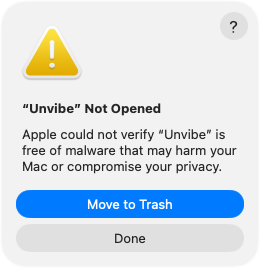
Real screen, macOS 26. On macOS 15 the two buttons sit side by side. - System Settings › Privacy & Security, scroll down to Security, then press Open Anyway. Confirm, then enter your Mac password. The button shows for about an hour after you try to open Unvibe.
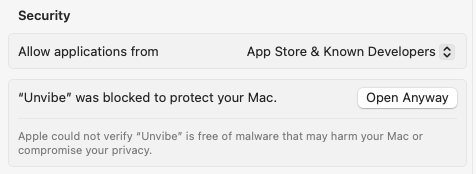
Real screen, macOS 15
The Terminal line checks the download against the published SHA-256 and Unvibe's self-signed signature before it installs anything. More help with the first open