Explain Ruby code
Paste Ruby and Vibe explains the blocks, symbols and mixins that keep it so short.
Up to 1,500 characters (about 60 lines). Your code is sent to Unvibe and Anthropic to write the explanation. Don't paste keys or passwords. Common key formats are refused.
Vibe25 lines selected
Press Explain it for the sample, or paste your own code first.
What this Ruby sample shows
- mixins
include Greetingaddsgreetto everyMember.include Comparableadds comparison methods such as<,>,==andbetween?, all built on the<=>method the class defines.- blocks
{ |m| m.points > 20 }is a block passed toselect, which keeps the members the block returns true for.- symbols
:nameand:pointsare symbols.map(&:name)turns the symbol into a block that callsnameon each member.- metaprogramming
attr_reader :name, :pointswrites the two reader methods for you when the class is defined, sopointsworks without adef points.
Good to know
<=>returns -1, 0 or 1.maxandsortonly need that method, so the script printsHi, I'm Ben, thenAna, Ben, then["Cy", "Ana", "Ben"].greetcallsnamewithoutself., because a method from a module runs on the object it was mixed into.
Watch out: Comparable also defines == from <=>, so two different members with the same points count as equal: Member.new("Al", 5) == Member.new("Bo", 5) is true.
Explain Ruby code beside your editor
Unvibe is a free app for Mac and Windows. In the app there is no pasting: select code in any app and press Control+U (Ctrl+Alt+U on Windows).
Install on Mac
curl -fsSL https://unvibe.site/install.sh | bashPaste into Terminal. Unvibe isn't notarized by Apple yet, so this is the smooth path.
Or download the .dmg · Intel Mac build · SHA-256 checksums
No install warning? Use Unvibe in your browser
Opening the .dmg the first time
- Open the .dmg and drag Unvibe to Applications.
- Open it once; macOS says it can't verify it. Click Done.
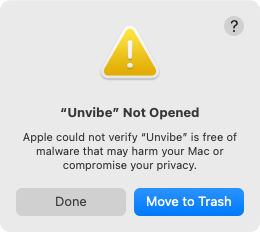
Real screen, macOS 15 - System Settings › Privacy & Security › Open Anyway. Confirm, then enter your Mac password. The button shows for about an hour after you try to open Unvibe.
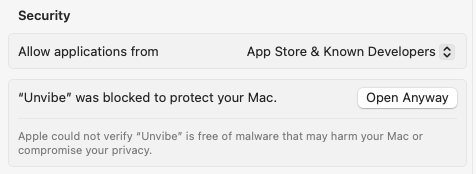
Real screen, macOS 15
The Terminal line checks the download against the published SHA-256 and Unvibe's self-signed signature before it installs anything. More help with the first open