Explain C++ code
Paste modern C++ and Vibe explains the templates, smart pointers and object lifetimes in it.
Up to 1,500 characters (about 60 lines). Your code is sent to Unvibe and Anthropic to write the explanation. Don't paste keys or passwords. Common key formats are refused.
Vibe25 lines selected
Press Explain it for the sample, or paste your own code first.
What this C++ sample shows
- templates
largestis written once for anyTthat can be copied and compared with>.largest(std::vector<int>{3, 9, 4})makes the compiler generate anintversion, which returns 9.- RAII
Documentprintsclosingin its destructor. The destructor runs on its own when theunique_ptrthat owns the document is destroyed at the end ofmain, so cleanup can't be forgotten.- move semantics
std::move(open.front())hands ownership tocurrent. The pointer left in the vector is now null, so the last line printstrue notes.txt.- pointers
std::unique_ptris a pointer that owns its object: one owner at a time, deleted automatically, and it can be moved but not copied.
Good to know
items.at(0)throwsstd::out_of_rangeon an empty vector, whereitems[0]would be undefined behavior.explicitstops a plainstd::stringfrom turning into aDocumentby accident, for example when passed to a function that takes aDocument.- The vector still holds one element after the move. It is an empty
unique_ptr, and dereferencing it is undefined behavior.
Watch out: closing notes.txt prints once, after everything else. The document is destroyed exactly once, by whichever unique_ptr owns it when main ends, here current.
Explain C++ code beside your editor
Unvibe is a free app for Mac and Windows. In the app there is no pasting: select code in any app and press Control+U (Ctrl+Alt+U on Windows).
Install on Mac
curl -fsSL https://unvibe.site/install.sh | bashPaste into Terminal. Unvibe isn't notarized by Apple yet, so this is the smooth path.
Or download the .dmg · Intel Mac build · SHA-256 checksums
No install warning? Use Unvibe in your browser
Opening the .dmg the first time
- Open the .dmg and drag Unvibe to Applications.
- Open it once; macOS says it can't verify it. Click Done.
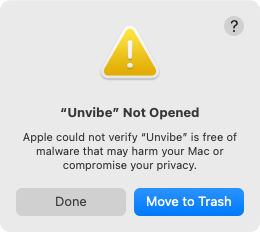
Real screen, macOS 15 - System Settings › Privacy & Security › Open Anyway. Confirm, then enter your Mac password. The button shows for about an hour after you try to open Unvibe.
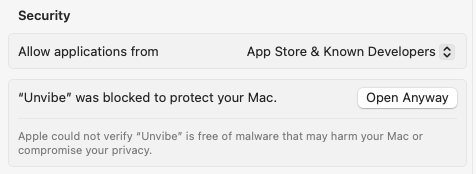
Real screen, macOS 15
The Terminal line checks the download against the published SHA-256 and Unvibe's self-signed signature before it installs anything. More help with the first open