Explain Swift code
Paste Swift from an app or a playground and Vibe explains what it does, optionals included.
Up to 1,500 characters (about 60 lines). Your code is sent to Unvibe and Anthropic to write the explanation. Don't paste keys or passwords. Common key formats are refused.
Vibe25 lines selected
Press Explain it for the sample, or paste your own code first.
What this Swift sample shows
- optionals
due: String?holds either a string ornil.due.map { ... }runs the closure only when there is a value, and?? ""supplies the fallback when there isn't.- protocols
Describablerequires a readablesummary.Todomeets it with a computed property, so any code that takes aDescribablecan use aTodo.- closures
{ $0.minutes <= 30 }is a closure, and$0is its first argument.map(\.title)passes a key path, a shorthand for{ $0.title }.
Good to know
- Structs get a memberwise initializer for free. That is where
Todo(title:due:minutes:)comes from. if let undated = ...unwraps the optional thatfirst(where:)returns, so the body only runs when an undated to-do exists. Here it printsWater plants (5 min).quickis["Water plants"], the only to-do that takes 30 minutes or less.
Watch out: first(where:) stops at the first match. Plan trip has no due date either but is never printed. Use filter to get all of them.
Explain Swift code beside your editor
Unvibe is a free app for Mac and Windows. In the app there is no pasting: select code in any app and press Control+U (Ctrl+Alt+U on Windows).
Install on Mac
curl -fsSL https://unvibe.site/install.sh | bashPaste into Terminal. Unvibe isn't notarized by Apple yet, so this is the smooth path.
Or download the .dmg · Intel Mac build · SHA-256 checksums
No install warning? Use Unvibe in your browser
Opening the .dmg the first time
- Open the .dmg and drag Unvibe to Applications.
- Open it once; macOS says it can't verify it. Click Done.
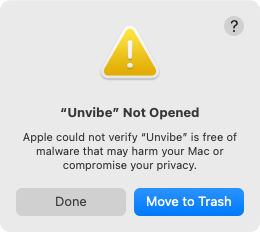
Real screen, macOS 15 - System Settings › Privacy & Security › Open Anyway. Confirm, then enter your Mac password. The button shows for about an hour after you try to open Unvibe.
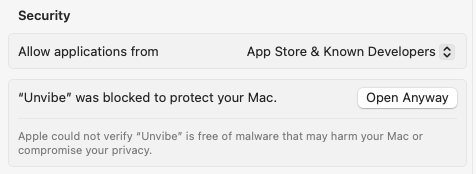
Real screen, macOS 15
The Terminal line checks the download against the published SHA-256 and Unvibe's self-signed signature before it installs anything. More help with the first open