Explain SQL code
Paste a SQL query and Vibe explains which rows it returns and why.
Up to 1,500 characters (about 60 lines). Your code is sent to Unvibe and Anthropic to write the explanation. Don't paste keys or passwords. Common key formats are refused.
Vibe11 lines selected
Press Explain it for the sample, or paste your own code first.
What this SQL sample shows
- joins
LEFT JOINkeeps every customer, including one with no matching orders. For that customer the order columns come back asNULL.- aggregation
GROUP BYfolds each customer's orders into one row.COUNT(o.id)counts only real orders, so a customer with none gets 0, whereCOUNT(*)would give 1.- window functions
RANK() OVER (...)runs after the grouping and numbers the rows by spend without merging them. Ties share a rank and the next rank is skipped: two customers at 1 are followed by 3.
Good to know
- The date filter sits in the
ONclause on purpose. Moved toWHERE, it would drop every customer without an order this year, and theLEFT JOINwould behave like an inner join. COALESCE(SUM(o.total), 0)turns theNULLsum of a customer with no orders into 0, both in the output and in the ranking.- Use
DENSE_RANK()to number ties 1, 1, 2 instead of 1, 1, 3. - On a large
orderstable, an index onorders (customer_id, created_at)lets the database find each customer's recent orders without reading the whole table. - This page is about what a query returns. A database's own
EXPLAINcommand answers a different question: it shows the plan the database will use to run the query, such as which index it reads and the order it joins the tables in.
Watch out: Comparing created_at with '2026-01-01' works when dates are stored as a date type or as ISO text like 2026-03-01. Text in another format, such as 03/01/2026, compares character by character and gives wrong results.
Explain SQL code beside your editor
Unvibe is a free app for Mac and Windows. In the app there is no pasting: select code in any app and press Control+U (Ctrl+Alt+U on Windows).
Install on Mac
curl -fsSL https://unvibe.site/install.sh | bashPaste into Terminal. Unvibe isn't notarized by Apple yet, so this is the smooth path.
Or download the .dmg · Intel Mac build · SHA-256 checksums
No install warning? Use Unvibe in your browser
Opening the .dmg the first time
- Open the .dmg and drag Unvibe to Applications.
- Open it once; macOS says it can't verify it. Click Done.
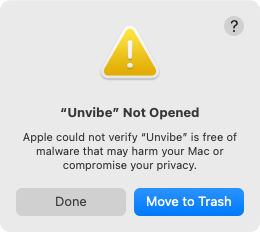
Real screen, macOS 15 - System Settings › Privacy & Security › Open Anyway. Confirm, then enter your Mac password. The button shows for about an hour after you try to open Unvibe.
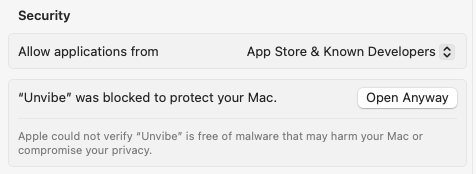
Real screen, macOS 15
The Terminal line checks the download against the published SHA-256 and Unvibe's self-signed signature before it installs anything. More help with the first open