Explain C code
Paste C and get its pointers, structs and memory explained in plain English before you compile.
Up to 1,500 characters (about 60 lines). Your code is sent to Unvibe and Anthropic to write the explanation. Don't paste keys or passwords. Common key formats are refused.
Vibe25 lines selected
Press Explain it for the sample, or paste your own code first.
What this C sample shows
- structs
typedef struct { ... } Player;defines a record with a 16-byte name and anintscore, and lets you writePlayerinstead of a fullstructtype.- manual memory
callocreserves room forcountplayers on the heap, andfree(team)gives it back. Nothing frees it for you.- pointers
make_playersreturns aPlayer *, the address of the first player.team[1]is the second player, the same as*(team + 1).- the stack
teamandplayersare local variables on the stack, but the players they point to live on the heap. That is why the players still exist aftermake_playersreturns.
Good to know
sizeof *playersasks for the size of whateverplayerspoints to, so the line stays correct if its type changes.callocreturnsNULLwhen it can't allocate, including whencounttimes the size of a player is too big for asize_t. Both functions check for that before touching the memory.snprintfwithsizeof players[i].namenever writes past the 16-byte array. A longer name is cut short instead of overflowing intoscore.
Watch out: After free(team), team still holds the old address. Using it again, or calling free on it twice, is undefined behavior. Setting team = NULL right after freeing makes that mistake easier to catch.
Explain C code beside your editor
Unvibe is a free app for Mac and Windows. In the app there is no pasting: select code in any app and press Control+U (Ctrl+Alt+U on Windows).
Install on Mac
curl -fsSL https://unvibe.site/install.sh | bashPaste into Terminal. Unvibe isn't notarized by Apple yet, so this is the smooth path.
Or download the .dmg · Intel Mac build · SHA-256 checksums
No install warning? Use Unvibe in your browser
Opening the .dmg the first time
- Open the .dmg and drag Unvibe to Applications.
- Open it once; macOS says it can't verify it. Click Done.
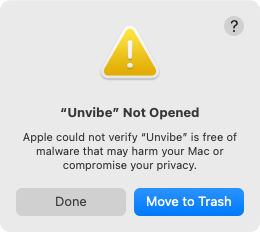
Real screen, macOS 15 - System Settings › Privacy & Security › Open Anyway. Confirm, then enter your Mac password. The button shows for about an hour after you try to open Unvibe.
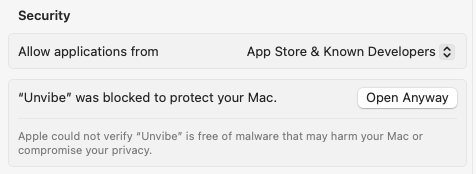
Real screen, macOS 15
The Terminal line checks the download against the published SHA-256 and Unvibe's self-signed signature before it installs anything. More help with the first open