Explain DNS records
Paste DNS records from your domain's settings or a zone file, and Vibe explains each one in plain English: which address the domain points to, what a CNAME does, where email goes, and what the SPF and DMARC text records say.
Up to 1,500 characters (about 60 lines). Your code is sent to Unvibe and Anthropic to write the explanation. Don't paste keys or passwords. Common key formats are refused.
Vibe15 lines selected
Press Explain it for the sample, or paste your own code first.
What this DNS records sample shows
- A, AAAA and TTL
@is the domain itself. ItsArecord is the IPv4 address, 203.0.113.10, andAAAAthe IPv6 one.$TTL 3600sets how many seconds a resolver may keep an answer before asking again, and dig showed 3600 on each A, AAAA, CNAME, MX, TXT and CAA answer from this file.- CNAME
- A
CNAMEmakes a name an alias of another name. Asked for www, the server answered with the CNAME to notes-app.example and that name's A record, 203.0.113.10. Asked for api, it answered only with the CNAME to app-7f3k.hosting.example; that name's own A record, 198.51.100.80, came from a second query. This server only holds zones and has recursion off, so it followed the CNAME only inside notes-app.example, not into hosting.example, even though it serves that zone too; a resolver, like the one your computer normally asks, follows the CNAME for you (RFC 1034). - MX
MXrecords say which servers take email for the domain. The number is the preference: lower comes first, so mail goes to mx1, with 10, before mx2, with 20. dig listed the 20 record first, the reverse of the file's order, but the number decides, not the order. Each MX points at a name, and that name needs its own A record: mx1.mail.example answered 198.51.100.25.- TXT: SPF and DMARC
- TXT records hold text that other systems read.
v=spf1 include:_spf.mail.example ~allis SPF: it lists the servers allowed to send the domain's email, and~allmarks everything else as suspicious. The record at_dmarcis DMARC:p=quarantineasks receivers to treat failing mail as spam, andruais where reports go.
Good to know
- Run with BIND 9.20.26:
named-checkzoneloaded the file (OK), and named, started as a normal user on 127.0.0.1, served it todigfrom the same release. The zone's names end in .example and the addresses are documentation ranges, all reserved for examples, so no real domain or public DNS server was involved. - A name that doesn't exist got
status: NXDOMAINwith 0 answers, plus the zone's SOA record. A CNAME can't share its name with other records: awwwTXT record next to the CNAME, or a CNAME on the bare domain, stopped the zone loading withCNAME and other data.CAA 0 issue "letsencrypt.org"says only Let's Encrypt may issue certificates for the domain. What TTLs, MX preference numbers, SPF, DMARC and CAA records mean comes from their standards, not from this run.
Before you trust it: The dot at the end of a name matters. With mx1.mail.example written without it, named-checkzone still said OK, with only a warning that mx1.mail.example.notes-app.example has no address records, but the server answered 10 mx1.mail.example.notes-app.example.: a name without the final dot gets the zone's own domain added. In a DNS provider's web form the rules can differ, so compare what dig returns with what you meant.
Explain DNS records beside your editor
When your AI tool writes DNS records, select the code in any app and press the shortcut. On a Mac that's Control+U, not Command+U (⌘U only works in Cursor and VS Code with the editor bridge). On Windows it's Ctrl+Alt+U. Vibe explains it beside your editor, you can ask it why, and Test me checks that you followed. Unvibe is a free app for Mac and Windows.
Install on Mac
curl -fsSL https://unvibe.site/install.sh | bashPaste into Terminal. Unvibe isn't notarized by Apple yet, so this is the smooth path.
Or download the .dmg · Intel Mac build · SHA-256 checksums
No install warning? Use Unvibe in your browser
Opening the .dmg the first time
- Open the .dmg and drag Unvibe to Applications.
- Open it once; macOS says it can't verify it. Click Done, not the blue Move to Trash.
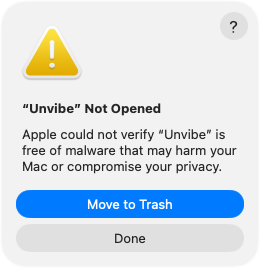
Real screen, macOS 26. On macOS 15 the two buttons sit side by side. - System Settings › Privacy & Security, scroll down to Security, then press Open Anyway. Confirm, then enter your Mac password. The button shows for about an hour after you try to open Unvibe.
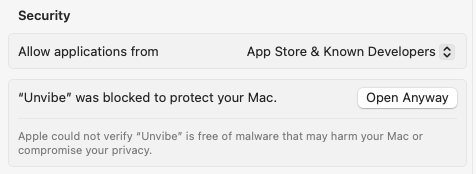
Real screen, macOS 15
The Terminal line checks the download against the published SHA-256 and Unvibe's self-signed signature before it installs anything. More help with the first open