A code explainer for Windows
Unvibe is a free Windows app. Highlight code in whatever program you are using, press Ctrl+Alt+U, and Vibe writes a plain English explanation in a panel next to it.
How it works on Windows
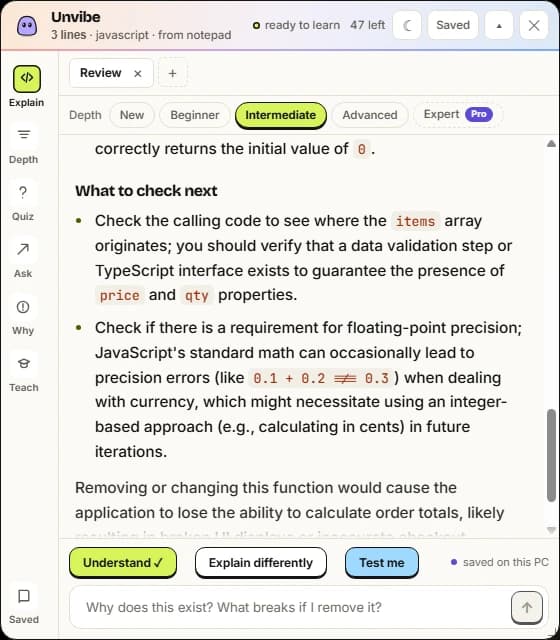
Highlight a few lines in VS Code, Cursor, Notepad or a browser tab and press Ctrl+Alt+U. Vibe's panel appears next to that window and the explanation fills in while you read. You never copy and paste the code into a chat.
If Ctrl+Alt+U clashes with another program, pick a different shortcut in Unvibe's Settings.
Which Windows
Windows 10 or Windows 11, on a 64-bit (x64) PC. The download is a single portable file, Unvibe-0.1.44-win-x64-portable.exe, that runs from wherever you save it.
To have Unvibe in your Start menu instead, open Windows PowerShell (not Command Prompt), paste this line and press Enter. It installs Unvibe, adds it to Start and opens it:
irm https://unvibe.site/install.ps1 | iexThe first run
Unvibe is not signed with a paid certificate yet, so when you first run the .exe Windows may show a blue “Windows protected your PC” box. Press More info, then Run anyway. You only do this once.
Work and school PCs can hide the Run anyway button. If Smart App Control is on (Windows 11), it blocks unsigned apps like Unvibe and allows no exception for a single app.
What Vibe can do with your code
- Explain it at the level you pick. New, Beginner, Intermediate and Advanced are free; Expert comes with Pro.
- Quiz you with Test me: one question written about the lines you highlighted.
- Keep the lessons you want in your Library, saved on this PC.
- See what changed in your repo in a Change Brief, built on your PC at no cost (its AI explanation is Pro).
- Answer “Why does this exist?” from the git blame of those lines and the file's 8 most recent commits, read from the repository on your PC.
What leaves your PC
Only the request you make: the highlighted code with its file name and language (on Pro, some code around it for context), or, on Pro, the git changes you ask the AI to explain, and any question you type. A request with a key or token in it is stopped on your PC, and a possible one asks you first; since version 0.1.44 that check covers your questions and Chat messages too. Your repository is never uploaded.
Get Unvibe for Windows
Free. No card, no API key.
Using a Mac? Unvibe for Mac. Not ready to install? Explain code in your browser. Every build is on the download page.