Explain HTTP headers
Paste the headers from curl -i or your browser's network tab and Vibe explains each one in plain English: what the status line says, how long the response may be cached, what a cookie allows, and which site may read it.
Up to 1,500 characters (about 60 lines). Your code is sent to Unvibe and Anthropic to write the explanation. Don't paste keys or passwords. Common key formats are refused.
Vibe13 lines selected
Press Explain it for the sample, or paste your own code first.
What this HTTP headers sample shows
- status line and body headers
HTTP/1.1 200 OKis the protocol and the status: 200 means it worked.Content-Typesays the body is JSON in UTF-8, andContent-Length: 46is the body's size in bytes, which matches the 46-byte JSON. A blank line ends the headers. The test server's code never setServerorDate: Python's http.server added both.- Cache-Control and ETag
private, max-age=60lets the browser reuse this response for 60 seconds and tells shared caches not to keep it.ETagis a fingerprint of this version. Sent back asIf-None-Match: "0e1a4ca84681cfe8", it gotHTTP/1.1 304 Not Modifiedwith an empty body: the copy the client already has is still current.- Set-Cookie
Set-Cookieasks the client to storesession=abc123for every path (Path=/) for 3600 seconds (Max-Age).HttpOnlyhides it from the page's JavaScript,Securelimits it to HTTPS, andSameSite=Laxkeeps it off most requests started by other sites. curl stored it in its cookie file with an#HttpOnly_prefix and the Secure column set to TRUE, and sent it back asCookie: session=abc123, even though this test ran over plain HTTP to 127.0.0.1. Check Secure cookies on the real HTTPS site.- Access-Control-Allow-Origin and Vary
Access-Control-Allow-Origin: http://localhost:5173lets a page from that one origin read this response in the browser. A page from any other origin can still send the request, and it still reaches the server, but the browser blocks that page from reading the answer.Vary: Origintells caches the answer depends on theOriginrequest header, so they don't hand one site's version to another.
Good to know
- Run with curl 8.21.0 against a test server written with Python 3.14.7's http.server on 127.0.0.1. The run used
curl -siwith the carriage returns at the ends of the header lines removed; the sample shows the command ascurl -i. Whatprivate,max-age,ETag,HttpOnly,Secure,SameSite,Varyand the CORS header mean comes from the HTTP standards and MDN's header reference, not from this run. curl isn't a browser, so this shows what the server sent, not what a browser does with it. /notesanswered301 Moved PermanentlywithLocation: /notes/42. curl stopped there without-L; with-Lit followed 1 redirect and got 200.
Before you trust it: An error status doesn't make curl fail. For a missing page the server answered HTTP/1.1 404 Not Found and curl exited with code 0, so a script that checks only the exit code sees success. With -f, curl exited with code 22 on the 404.
Explain HTTP headers beside your editor
Unvibe is a free app for Mac and Windows. In the app there is no pasting: select code in any app and press Control+U (Ctrl+Alt+U on Windows).
Install on Mac
curl -fsSL https://unvibe.site/install.sh | bashPaste into Terminal. Unvibe isn't notarized by Apple yet, so this is the smooth path.
Or download the .dmg · Intel Mac build · SHA-256 checksums
No install warning? Use Unvibe in your browser
Opening the .dmg the first time
- Open the .dmg and drag Unvibe to Applications.
- Open it once; macOS says it can't verify it. Click Done, not the blue Move to Trash.
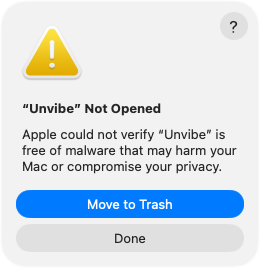
Real screen, macOS 26. On macOS 15 the two buttons sit side by side. - System Settings › Privacy & Security, scroll down to Security, then press Open Anyway. Confirm, then enter your Mac password. The button shows for about an hour after you try to open Unvibe.
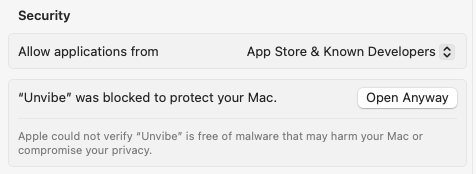
Real screen, macOS 15
The Terminal line checks the download against the published SHA-256 and Unvibe's self-signed signature before it installs anything. More help with the first open