Explain the code Cursor wrote
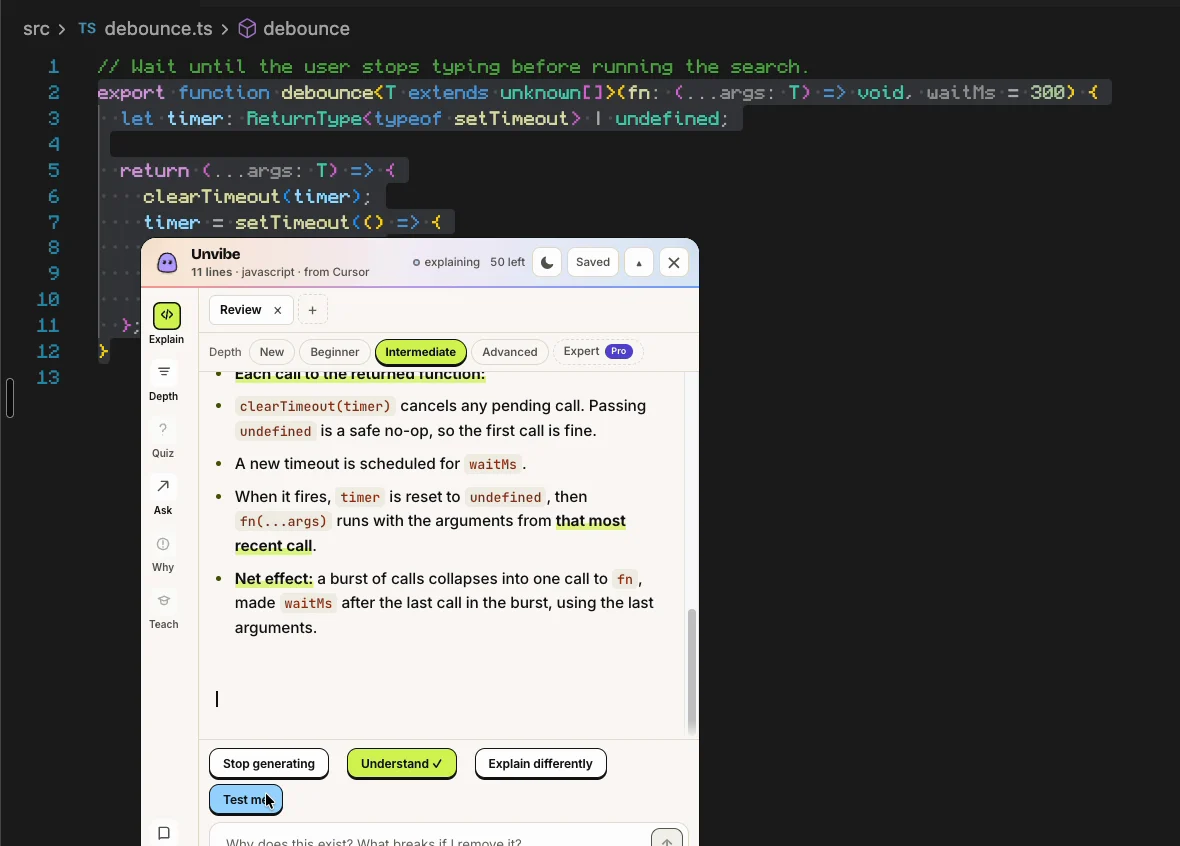
Unvibe is a free desktop app for Mac and Windows that explains the code you select in plain English. Cursor's chat says what it meant to do; the file is what it did. Select the code Cursor wrote, press Control+U (Ctrl+Alt+U on Windows), and Vibe explains it in a panel beside Cursor, at the depth you pick.
Download freeNo account and no API key to start.
A worked example
Say you ask Cursor's Agent for a search box that loads results as you type. This hook is a sample written by hand for this page, the kind of code an agent hands back for that request. It is not a recorded Cursor run:
export function useSearch(query: string) {
  const [results, setResults] = useState<Result[]>([]);
  const [loading, setLoading] = useState(false);

  useEffect(() => {
    if (!query.trim()) {
      setResults([]);
      return;
    }
    const controller = new AbortController();
    setLoading(true);
    fetch(`/api/search?q=${encodeURIComponent(query)}`, { signal: controller.signal })
      .then((res) => res.json())
      .then((data) => setResults(data.results))
      .catch((err) => {
        if (err.name !== "AbortError") console.error(err);
      })
      .finally(() => setLoading(false));
    return () => controller.abort();
  }, [query]);

  return { results, loading };
}
The notes below are written by hand to show what a careful read finds. They are not output from Unvibe.
- The effect runs again every time
querychanges, and the function it returns runs first, before the next run. That function callscontroller.abort(), which cancels the previous request. Without it, a slow answer for “re” could arrive after the answer for “react” and overwrite it. An agent often addsAbortControllerfor that reason without being asked, and the request did not ask for it. - A cancelled request still ends. Its
finallyruns and setsloadingto false, even though the newer request is still in flight. Type fast and the spinner flickers off while results are still loading. That is a real bug, and it is easy to miss because every line looks reasonable on its own. err.name !== "AbortError"is deliberate: an abortedfetchrejects with an error namedAbortError, and that one is expected, so it is not logged.- There is no check of
res.ok. When the server answers 500 with an HTML error page,res.json()throws, the error is logged to the console, and the old results stay on screen with nothing to tell the user. encodeURIComponentkeeps a query likea&bor50%from being read as part of the URL instead of the search text.- There is no delay between keystrokes, so typing “react” sends five requests. Whether that matters depends on what
/api/searchcosts.
The sample does what was asked. It also makes two decisions that were not asked for, one of them wrong. Reading the hook is how you find out which. Start with the lines you would not have written yourself: here, AbortController, signal, finally and the dependency array.
Doing it with Unvibe
- Select the hook in Cursor's editor, or the output of
git diffin Terminal. Unvibe works in any app where you can select code; in Cursor, the editor bridge (Unvibe's Settings, Integrations) adds ⌘U (Ctrl+U on Windows). - Press Control+U on a Mac or Ctrl+Alt+U on Windows. The panel opens beside your editor and the explanation streams in as it is written.
- Pick a depth. New, Beginner, Intermediate and Advanced are free; Expert is part of Pro. Switch any time and the same code is explained again at that depth.
- Type a follow-up under the explanation, such as “Why does loading turn off while the second request is still running?” The answer stays about the code you selected.
- Press Test me. It writes a question about this exact code, and up to three if you want more. Miss one and the lesson is saved to revisit later.
You can ask Cursor's chat to explain its own code, and often that is enough. The difference is what happens next: a chat answer scrolls away, while Unvibe's explanation sits beside the code at the depth you chose, is saved to your Library, and Test me can check that you got it. It also works on code you select outside Cursor: a git diff in Terminal, a file on GitHub, a snippet in the docs.
When Cursor's Agent changes many files at once, Briefs list what changed in your working tree, staged files, the latest commit or a branch. Briefs are made on your computer for free; the AI explanation of a change is Pro. After-Agent Review in Briefs ranks the change by what deserves a human look, on your computer; the AI explanation of that change is Pro.
Yes. AI can be wrong even when it sounds sure. Each explanation sits next to the code it describes so you can check it, and Test me helps you spot what doesn't add up.
What leaves your computer
The code you select is sent to a cloud model to write the explanation. Only what you ask about: the selected code and its language, the file's path inside your project when Unvibe knows which file it came from (like src/lib/retry.ts), and the name of the project folder you last worked in with Unvibe. With Pro, some nearby code is added for context, and Briefs send the git changes you ask the AI to explain. Any question you type is sent too. Unvibe checks the code for keys and tokens on your computer first, and from version 0.1.44 your questions and Ask Vibe chat messages too. A known key stops the request. Your repo is never uploaded. If you add your own API key in Settings, the app sends the request straight to that provider instead.
Free and Pro
Free. 50 explanations in your first 30 days without signing in, then 50 explanations a month when you sign in. No card and no separate API key.
- Explain code you select in any app
- New, Beginner, Intermediate and Advanced depths
- Follow-ups and Test me
- Lessons saved to your Library
- Briefs of your Git changes, made on your computer
- “Why does this exist?” from your Git history
- Your code checked for keys and tokens on your device
Pro, $9 a month or $81 a year. One developer account. Your Free plan keeps working until then.
- Everything in Free
- Expert depth
- AI explanations of Git diffs and change Briefs
- Answers that use nearby files
- 200 AI explanations a month
Explain the next thing Cursor writes
Unvibe is a free app for Mac and Windows. There is nothing to paste: select code in Cursor or any other app and press Control+U (Ctrl+Alt+U on Windows).
Download freeNo account and no API key to start.