Spot the problem in this AI code
SQL (SQLite). The task: "Write a SQLite query that counts each customer's orders and total, leaving out cancelled ones." Read the code, then pick what goes wrong.
-- Each customer's orders, leaving out cancelled ones
SELECT customer_id,
       COUNT(*) AS active_orders,
       SUM(total) AS active_total
FROM orders
WHERE status <> 'cancelled'
GROUP BY customer_id
ORDER BY customer_id;
New orders have no status yet (NULL). What goes wrong?
Show the answerHide the answer
Answer B: Orders with a NULL status are dropped, so customer 2 vanishes from the report
Customer 1 has orders of 20.0 (paid), 15.0 (NULL) and 30.0 (cancelled), and customer 2 has 1 order of 40.0 with a NULL status. The query returned only 1|1|20.0, because NULL <> 'cancelled' is neither true nor false and WHERE throws those rows away. Changing the filter to status IS NOT 'cancelled', which treats NULL as an ordinary value, returned 1|2|35.0 and 2|1|40.0.
-- Each customer's orders, leaving out cancelled ones
SELECT customer_id,
       COUNT(*) AS active_orders,
       SUM(total) AS active_total
FROM orders
WHERE status IS NOT 'cancelled'
GROUP BY customer_id
ORDER BY customer_id;
Explain it at your depth
The code is already in the box below. Pick a level and press Explain it, and Vibe explains it in plain English. Free, no account.
Up to 1,500 characters (about 60 lines). Your code is sent to Unvibe and Anthropic to write the explanation. Don't paste keys or passwords. Common key formats are refused.
Vibe9 lines selected
Press Explain it for the sample, or paste your own code first.
Explain code beside your editor
When your AI tool writes code, select the code in any app and press the shortcut. On a Mac that's Control+U, not Command+U (⌘U only works in Cursor and VS Code with the editor bridge). On Windows it's Ctrl+Alt+U. Vibe explains it beside your editor, you can ask it why, and Test me checks that you followed. Unvibe is a free app for Mac and Windows.
Install on Mac
curl -fsSL https://unvibe.site/install.sh | bashPaste into Terminal. Unvibe isn't notarized by Apple yet, so this is the smooth path.
Or download the .dmg · Intel Mac build · SHA-256 checksums
No install warning? Use Unvibe in your browser
Opening the .dmg the first time
- Open the .dmg and drag Unvibe to Applications.
- Open it once; macOS says it can't verify it. Click Done, not the blue Move to Trash.
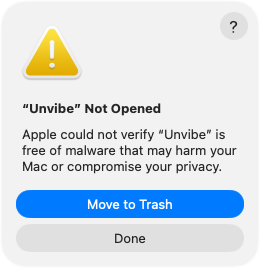
Real screen, macOS 26. On macOS 15 the two buttons sit side by side. - System Settings › Privacy & Security, scroll down to Security, then press Open Anyway. Confirm, then enter your Mac password. The button shows for about an hour after you try to open Unvibe.
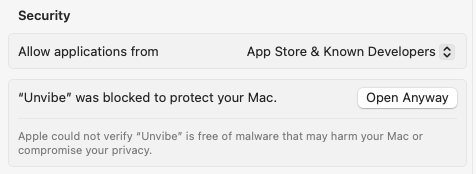
Real screen, macOS 15
The Terminal line checks the download against the published SHA-256 and Unvibe's self-signed signature before it installs anything. More help with the first open