Spot the problem in this AI code
7 short snippets, each with one mistake that is easy to miss when you accept code without reading it. Pick an answer and the page shows what goes wrong and the fix. Each snippet was written with an AI tool for this page, with one mistake left in on purpose. We ran every snippet and every fix to check them.
The puzzles
- Puzzle 1: JavaScript (Node)Write a function that adds up the order counts for a list of user IDs
- Puzzle 2: TypeScriptWrite a TypeScript function that turns a due date like 2026-12-01 into a label like Dec 1, 2026
- Puzzle 3: PythonWrite a function that starts a shopping cart for a user, with optional starting items
- Puzzle 4: SQL (SQLite)Write a SQLite query that counts each customer's orders and total, leaving out cancelled ones
- Puzzle 5: BashWrite a bash script that copies every .txt file in a folder into a backup folder
- Puzzle 6: JavaScript (Node)Write a function that returns the top 3 players by score for the leaderboard
- Puzzle 7: PythonWrite a function that splits a mailing list into batches of 100 for the email API
Explain code beside your editor
When your AI tool writes code, select the code in any app and press the shortcut. On a Mac that's Control+U, not Command+U (⌘U only works in Cursor and VS Code with the editor bridge). On Windows it's Ctrl+Alt+U. Vibe explains it beside your editor, you can ask it why, and Test me checks that you followed. Unvibe is a free app for Mac and Windows.
Install on Mac
curl -fsSL https://unvibe.site/install.sh | bashPaste into Terminal. Unvibe isn't notarized by Apple yet, so this is the smooth path.
Or download the .dmg · Intel Mac build · SHA-256 checksums
No install warning? Use Unvibe in your browser
Opening the .dmg the first time
- Open the .dmg and drag Unvibe to Applications.
- Open it once; macOS says it can't verify it. Click Done, not the blue Move to Trash.
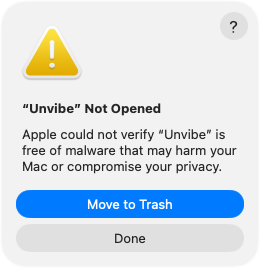
Real screen, macOS 26. On macOS 15 the two buttons sit side by side. - System Settings › Privacy & Security, scroll down to Security, then press Open Anyway. Confirm, then enter your Mac password. The button shows for about an hour after you try to open Unvibe.
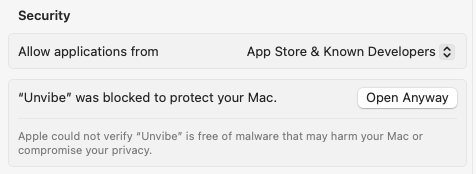
Real screen, macOS 15
The Terminal line checks the download against the published SHA-256 and Unvibe's self-signed signature before it installs anything. More help with the first open