Help
Nothing happens when I press Control+U.
Unvibe's shortcut copies the code you selected and explains it in a panel beside your editor. If pressing it does nothing, or the panel opens without your code (it says Ready when you are), go down this list.
First: the right keys, with Unvibe running
- Mac: Control+U. That's the Control key, not Command.
- Windows: Ctrl+Alt+U. Plain Ctrl+U only works in VS Code and Cursor after you add the editor bridge in Unvibe's Settings › Integrations.
- Select the code first. Highlight a few lines in any app, then press the shortcut. With nothing selected, the panel opens without your code and explains nothing.
- Unvibe has to be running. Its icon sits in the Mac menu bar (top right) or the Windows notification area. Click it to open Unvibe (on a Mac, then choose Open Unvibe). If it isn't there, open Unvibe from Applications or the Start menu.
On a Mac
- The panel opens with a paste box and a Turn on the shortcut button. macOS hasn't allowed Accessibility for Unvibe, so it can't copy your selection. This also happens after some updates. Allow Accessibility, one switch. Until then, copy the code (⌘C) and paste it into that box: it explains it the same way.
- You pressed Don't Allow when macOS asked to let Unvibe control System Events. macOS asks once, a few seconds after Unvibe first opens. Unvibe uses System Events to copy your selection, so after a Don't Allow the panel opens without your code, and macOS doesn't ask again. Open System Settings › Privacy & Security › Automation, find Unvibe, and switch on System Events. Then select the code and press Control+U again.
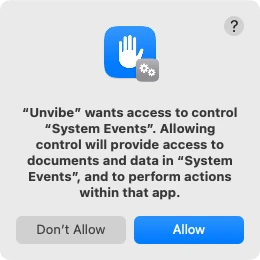
Real screen, macOS 15 · Unvibe 0.1.49 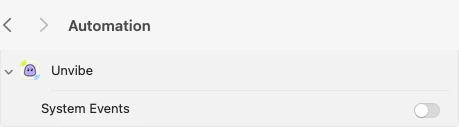
Real screen, macOS 15 · Unvibe 0.1.49
On Windows
- Check the keys: Ctrl+Alt+U, all three together. Windows has no permission to allow.
- You selected code, but the panel opens without it. Some apps don't let Unvibe copy the selection (Unvibe may also say “Couldn't copy from” that app). Copy the code yourself (Ctrl+C, or Ctrl+Insert in a terminal) and press Explain my clipboard in the panel.
On both
- Pressing it does nothing at all, and no panel opens. Another app may own the keys (Unvibe may say “That shortcut is in use by another app.” when it opens). Open Settings › General, click the shortcut next to Activation shortcut, and press a different combination. If Unvibe says it's taken or invalid, try another.
- Sending is switched off. If you turned off Send code to … in Settings › Privacy & Data (it names Anthropic (Claude) unless you added your own AI key), nothing is sent and the shortcut is off too. Switch it back on, and Unvibe asks you once before it sends code.
- The panel says Session paused. Your free explanations are used up. Signed out, the free explanations on this computer don't refill: sign in to keep going on the Free plan, which refills every month. Signed in, the panel shows the date they refill. How the free allowance works.
Still stuck? Email support@unvibe.site with a screenshot, your Unvibe version (bottom of Settings) and your Mac or Windows version. Installing for the first time? Install help. Last checked with Unvibe 0.1.49.