Help
Allow Accessibility so Control+U works.
On a Mac, Unvibe needs one macOS permission, Accessibility, to copy the code you select when you press Control+U. You can use Unvibe without it: paste code into Unvibe instead. Windows needs no permission; its shortcut is Ctrl+Alt+U.
What it's for
In the app's words: Unvibe uses it “only to copy the code you selected when you press Control+U, then sends that code to Anthropic (Claude) through Unvibe to explain it. It never reads your keystrokes or your screen.”
Switch it on
- In Unvibe, open Settings (bottom of the sidebar), then General, and press Allow Accessibility. During setup, the last step's Turn on the shortcut button does the same.
- macOS opens System Settings › Privacy & Security › Accessibility.
- Find Unvibe in the list and switch it on. macOS may ask for your password.
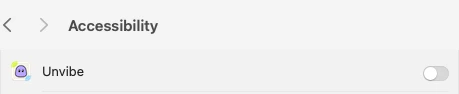
Real screen, macOS 15 · Unvibe 0.1.49 - Come back to Unvibe. The screen updates by itself and says Allowed.
Then select code in any app and press Control+U.
Switched it on, but it still says Not allowed yet
macOS is holding an old Unvibe entry from a previous version. In Unvibe's Settings › General, press Allow Accessibility, then Fix it under it. Switch Unvibe on again in the list that opens, then press Restart Unvibe. (While setup's shortcut step waits for the switch, the same two buttons sit under Switched it on and nothing changed?)
The shortcut stopped after an update
After an update, if Control+U opens a paste box and a Turn on the shortcut button instead of explaining your code, macOS dropped the old permission (Unvibe may also say “Unvibe updated. To use the shortcut again, open Settings, General, and press Allow Accessibility.”). Do the steps above once more.
Turn it off
Open System Settings › Privacy & Security › Accessibility and switch Unvibe off. Control+U then can't copy your selection, and pasting code into Unvibe keeps working.
Allowed, and Control+U still does nothing? Every other cause. Still stuck? Email support@unvibe.site with a screenshot and your macOS version. Last checked with Unvibe 0.1.49.