Help
“Windows protected your PC” when opening Unvibe.
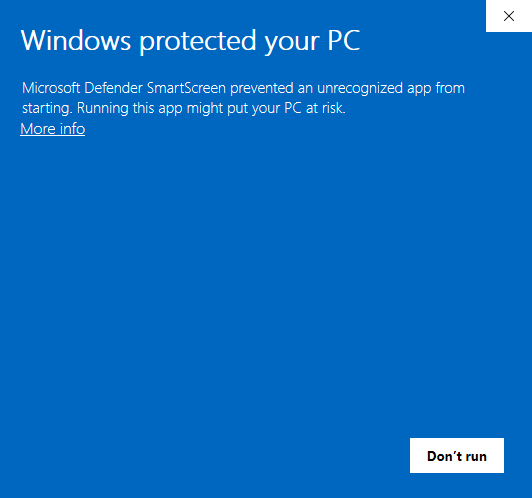
The first time you run the Unvibe download, a blue box says “Microsoft Defender SmartScreen prevented an unrecognized app from starting.” It shows because Unvibe is new and not yet signed with a paid certificate. Two presses get past it, and a PowerShell line installs without it.
Press More info, then Run anyway
- If your browser warns about the download first, keep it. In Edge, press … next to the download, then Keep, then Show more, then Keep anyway.
- Run the file. In the “Windows protected your PC” box, press More info. The link is small, under the text.
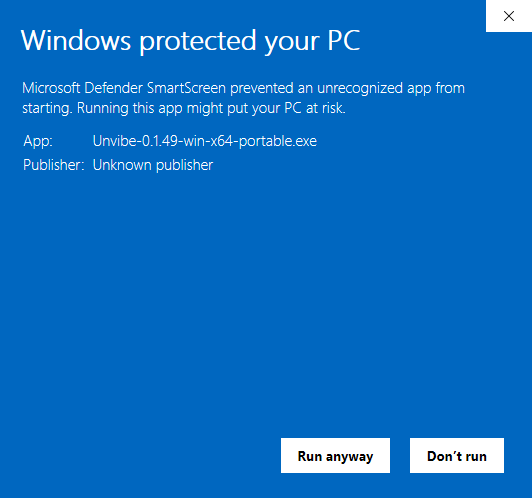
Real screen, Windows - The box now shows the file name (App: Unvibe-…-win-x64-portable.exe) and “Publisher: Unknown publisher”. Press Run anyway.
Real screen, Windows - Unvibe opens and stays in your taskbar. Later versions install from inside the app.
Or one PowerShell line
Open PowerShell (press the Windows key, type PowerShell, press Enter), paste this line and press Enter. It downloads Unvibe, installs it and opens it, with no SmartScreen box.
irm https://unvibe.site/install.ps1 | iex
Read the script before you run it: it's public, and Install help shows where.
No Run anyway button
- Work or school PC. An administrator can remove the button. Email us and we'll help.
- Smart App Control is on (Windows 11). Email us first and we'll help. Microsoft's Smart App Control FAQ says it blocks an unsigned app when its security service can't vouch for it, that there is currently no way to allow a single app, and that Smart App Control can be turned off in the Windows Security app's settings; recent Windows updates let it be turned back on later without reinstalling Windows. Turning it off is your call: it stops checking every app, not just Unvibe.
Still stuck? Email support@unvibe.site with a screenshot and your Windows version. All the install steps for Mac and Windows: Install help. Last checked with Unvibe 0.1.49.