
(01) Pick your depth
Beginner gets the plain idea. Advanced gets the mechanism.

Unvibe is a free desktop app for Mac and Windows that explains the code you select in plain English.
(The idea)
(How it works)
(Briefs) After-agent review

Built from local git on this computer.
Wisteria, Claude Monet, c. 1925 · public domain
(In the panel)
Beginner gets the plain idea. Advanced gets the mechanism.
Why does this exist? What breaks if I remove it?

Test me asks up to 3 questions about the code you just read.

Cursor, VS Code, Xcode, Terminal: wherever you read code.Cursor, VS Code, Terminal: wherever you read code.
ControlUCtrlAltU
Real screens, sample code · Unvibe 0.1.49
(Test me)


Lilacs in the Sun, Claude Monet, 1873 · public domain
(Privacy)
Unvibe never changes your code.
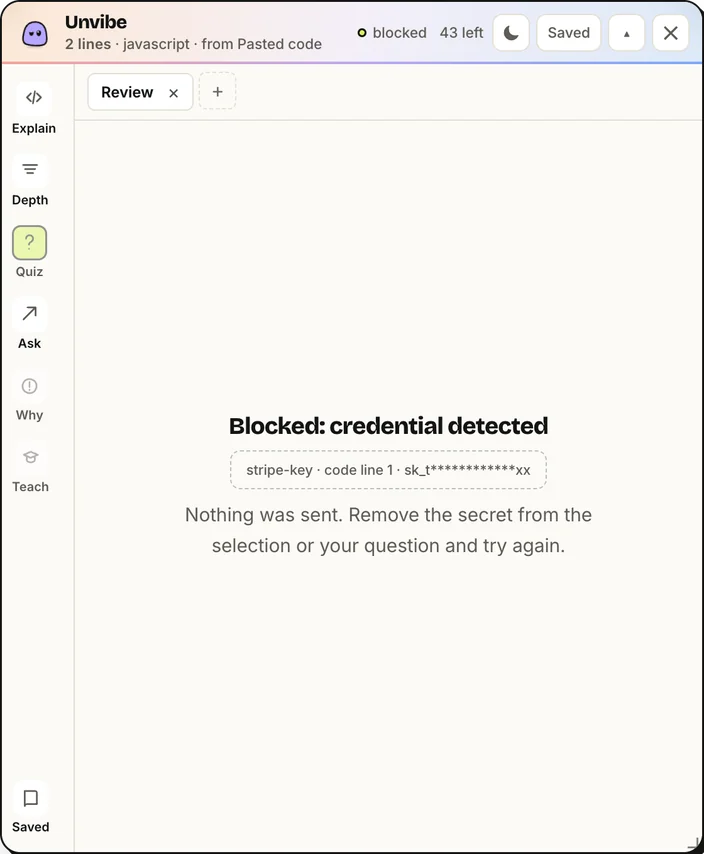
Unvibe checks for keys and tokens on your computer first, and a known key stops the request.
(What you get)
Free needs no card and no API key.
| Feature | Free | Pro |
|---|---|---|
| Explain code you select in any app | ||
| New, Beginner, Intermediate and Advanced depths | ||
| Follow-ups and Test me | ||
| Lessons saved to your Library | ||
| Briefs of your Git changes, made on your computer | ||
| “Why does this exist?” from your Git history | ||
| Your code checked for keys and tokens on your device | ||
| Expert depth | No | |
| AI explanations of Git diffs and change Briefs | No | |
| Answers that use nearby files | No | |
| 200 AI explanations a month | No |
50 explanations in your first 30 days without signing in, then 50 explanations a month when you sign in. No card and no separate API key.
Prices in USD. Pro and Teams are not on sale yet, so nothing is billed today. Explanation text is not shared across seats.
See all plansA free desktop app for Mac and Windows. Select code in any app and press Control+U (Ctrl+Alt+U on Windows). A panel beside your editor explains it at the depth you pick. Ask follow-ups, check yourself with Test me (up to 3 questions about that code), and save the lesson to your Library. The Today page sets a small daily goal: explain one piece of code and answer one question.
Any app where you can select code: Cursor, VS Code, Xcode, Terminal, your browser and more. In Cursor and VS Code, an optional editor bridge adds ⌘U (Ctrl+U on Windows).
Only what you ask about: the selected code and its language, the file's path inside your project when Unvibe knows which file it came from (like src/lib/retry.ts), and the name of the project folder you last worked in with Unvibe. With Pro, some nearby code is added for context, and Briefs send the git changes you ask the AI to explain. Any question you type is sent too. Unvibe checks the code for keys and tokens on your computer first, and from version 0.1.44 your questions and Ask Vibe chat messages too. A known key stops the request. Your repo is never uploaded. If you add your own API key in Settings, the app sends the request straight to that provider instead.
Yes. New, Beginner, Intermediate and Advanced are free. Expert is part of Pro. Switch any time and the same code is explained again at that depth.
Yes. Free covers explanations at New through Advanced, follow-ups, Test me and your Library: 50 explanations in your first 30 days without signing in, then 50 explanations a month when you sign in. Briefs of your Git changes and “Why does this exist?” are free too and run on your computer. No card and no API key.
Yes. Download the .exe from the Download page, or paste irm https://unvibe.site/install.ps1 | iex into PowerShell. The app isn't signed yet, so SmartScreen may warn the first time. Then select code in any app and press Ctrl+Alt+U.
Yes. AI can be wrong even when it sounds sure. Each explanation sits next to the code it describes so you can check it, and Test me helps you spot what doesn't add up.

Available for macOS and Windows